Most AI tools that have entered the industrial automation space over the past two years share a common architecture: they sit outside the engineering environment. You copy configuration data into a chat window, ask a question, get an answer, and copy something back. The AI is an assistant working alongside the tool, not inside it.
That works for certain tasks: understanding a standard, debugging a script, generating a code snippet. But it does not change the core economics of SCADA development, because all the mechanical configuration work, creating tags, building displays, writing scripts, setting up alarms, configuring device channels and protocol nodes, still happens manually, one step at a time, by a human being inside the engineering tool.
A relatively new open standard called the Model Context Protocol changes that relationship. Understanding what MCP does and how it works helps clarify why some AI integrations in industrial software are architecturally different from others, and why that architecture matters for your projects.
What MCP Is
The Model Context Protocol is an open standard published by Anthropic in late 2024. Its purpose is straightforward: give AI models structured, programmatic access to external systems, databases, applications, APIs, engineering tools, so that AI operates within those systems rather than just talking about them.
Before MCP, connecting an AI model to an application meant custom integration work for every application. Each vendor that wanted AI capabilities had to build their own bridge, their own data formats, their own API design, their own validation logic. An AI model’s ability to work with one application told you nothing about whether it could work with another. The integration was proprietary and fragile.
MCP defines a common interface. An application exposes an MCP server. Any AI model that supports the MCP client standard connects to it. The AI discovers what operations the server offers and calls them using the defined protocol. The application developer controls what the AI sees and does. The AI figures out how to use those capabilities to accomplish what the user describes.
Think of it as a USB standard for AI-to-application communication. Before USB, every peripheral had its own connector and its own driver. MCP does the same thing for AI: one protocol, many applications.
Why the Integration Model Matters for Industrial Software
Industrial engineering tools have complex internal structures that make this harder, and more valuable, than typical software integration.
A SCADA platform does not just store data. It maintains relationships between tags, devices, displays, alarms, historian configurations, scripts, security policies, Unified Namespace nodes, protocol channels, and points. Those relationships have rules. A tag that does not exist cannot be referenced in an alarm. An alarm without a proper deadband will chatter. A display object bound to a nonexistent tag will fail at runtime. A device point with an incorrect address format for its protocol will never acquire data.
An AI model working from general knowledge cannot navigate those relationships reliably. It does not know your platform’s specific object model, your naming conventions, the validation rules that prevent bad configuration, or the correct address format for a Modbus TCP register versus an Allen-Bradley EtherNet/IP tag. It generates plausible-looking output that an engineer then has to verify and correct before it is usable.
An AI model connected through MCP to a server that exposes the actual engineering tool’s object schema operates differently. The server defines exactly what objects exist, what properties they have, what operations are valid, and what constraints apply. The AI reads the current project state through the server, then writes new configuration through the server. Every operation passes through the server’s validation layer. The AI cannot create a tag with an invalid type or bind a display object to a tag that does not exist, because the server rejects the operation before it executes.
This is the difference between an AI that describes how to build something and an AI that builds it. The MCP architecture is what makes the second one possible in a reliable, platform-aware way.
How It Works in Practice
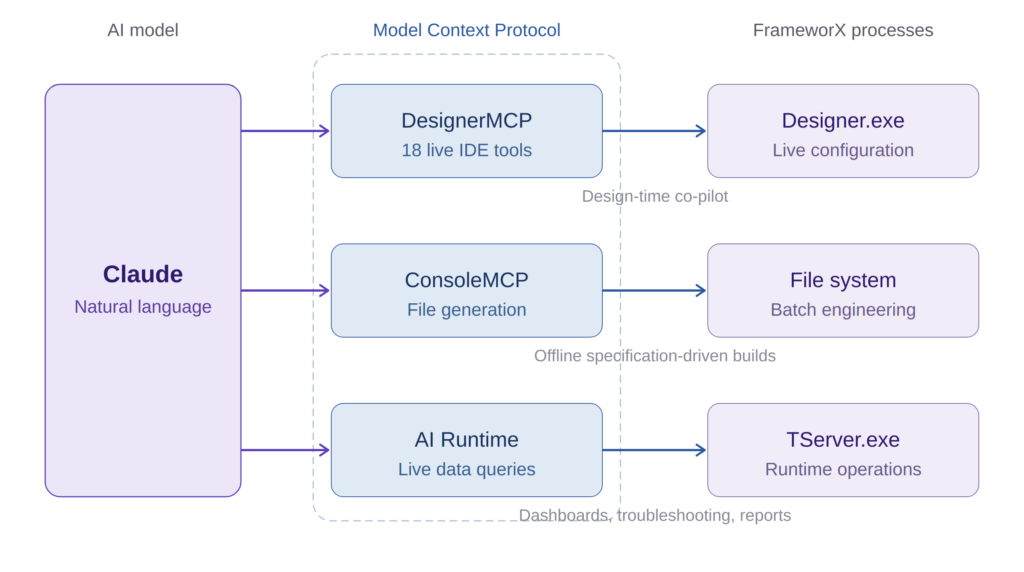
FrameworX AI Designer, which we built at Tatsoft, ships with native MCP integration, to our knowledge, the deepest MCP implementation in any industrial platform. The architecture has three distinct MCP services, and the distinction matters.
DesignerMCP connects the AI to the running Designer IDE. This is the live co-pilot: Claude connects via MCP, and from that point the engineer works in natural language while the AI works directly inside the Designer. The service exposes 18 tools covering the full solution lifecycle: tags, alarms, historian, devices, protocols, displays, symbols, scripts, Unified Namespace nodes, security, documentation, and project auditing. Every change the AI makes appears in the Designer in real time. An orange border and “AI Designer” badge make the connection visible.
ConsoleMCP connects Claude Code to a file-based engineering workflow. No running Designer needed. The AI generates JSON configuration files following the FrameworX export format, which the engineer imports into Designer for validation and deployment. This is the batch engineering path: generate a complete solution from a specification document, or produce configuration for a project that does not yet have a running environment.
AI Runtime is a separate service that connects to the running solution server (TServer.exe) for live data queries: tag values, alarm status, historian trends, namespace browsing. This is the operations-side integration. AI-powered dashboards, intelligent troubleshooting, automated reports from production data. And because FrameworX compiles .NET code at runtime, engineers create custom MCP tools that expose domain-specific queries, “get tank levels” instead of “read Tag.Area1.Tank3.LT001.PV,” with validation and access control built in.
These three services connect to three different processes (Designer.exe, file system, TServer.exe) because the operations are fundamentally different. Design-time configuration, offline engineering, and runtime data access each have their own constraints, security models, and validation requirements. Mixing them would compromise all three.
What I find most impressive every time I use it is the progressive knowledge delivery. We did not dump the entire platform documentation into the AI’s context window and hope for the best. Instead, the system delivers knowledge progressively: architecture concepts load when the AI connects, module schemas load on first access to each module, field-level guidance arrives with each schema fetch, and build playbooks load on demand when the AI needs step-by-step recipes for complex patterns. The AI receives exactly what it needs at the moment it needs it.
The result: engineers using FrameworX AI Designer report productivity improvements of 2x to 10x for configuration tasks. But the number that matters more to me is what happens with legacy projects. A customer has an application built five years ago by an engineer who left. Nobody understands it. With the AI connected via MCP, they open that solution and in 10 minutes they have the full picture: what is configured, how things connect, what the logic does, where potential issues are. That is not a development tool. That is a platform intelligence tool.
What the Engineer Controls
The most common concern I hear when demonstrating AI that operates directly inside an engineering tool: who controls what the AI creates?
In FrameworX, the MCP architecture addresses this through an explicit ownership model. The first AI tool call in a session triggers an authorization prompt, the engineer approves the connection before anything happens. From that point, the MCP Category system tags AI-created objects as AI-owned. The AI fully modifies objects it created. For engineer-created objects, the AI is limited to annotating the Description field, unless the engineer explicitly re-adds the MCP category to unlock full access.
Every change is logged with the same audit trail that captures human changes. The Designer shows a visual indicator when AI is actively working. The AI responds to explicit engineer requests. It does not execute multi-step plans autonomously in the background. Ask it to add 12 instrument tags, it adds 12 and stops. Ask it to review alarm configuration against ISA-18.2 guidelines, it reviews and reports back. The engineer decides what to act on.
This is a deliberate design choice. In the engineering environment, every configuration decision has consequences at runtime and traceability is a compliance requirement, not a preference. The AI is a collaborator, but the engineer remains the authority.
What Engineers Should Ask
As AI capabilities show up in more industrial tools, the architecture behind the integration determines what you actually get. A few questions cut through the marketing:
Does the AI know your platform’s actual object model? Not general SCADA concepts, your specific platform’s types, properties, validation rules, address formats, naming conventions. If the AI is working from training data rather than live schema access, you are getting suggestions that need verification, not valid configuration.
Does it write directly into your live project? Copy-paste between a chat window and your engineering tool reintroduces manual work and error at every handoff. Look for live, validated writes: changes that appear in your IDE as the AI works, validated by the platform before they execute.
Is the integration built on an open standard? This is where MCP changes the economics. An open standard means improvements to AI model capabilities automatically benefit your integration. You get a smarter collaborator without waiting for your platform vendor to update their proprietary bridge. It also means you are not locked to one AI model. As better models emerge, they connect to the same MCP server.
What happens when the AI gets it wrong? In a well-designed MCP integration, the server’s validation layer catches invalid operations before they execute. You get a clear error, not a corrupt project. In a generate-and-apply workflow, invalid configuration may not surface until testing or deployment, when the cost of finding it is highest.
The Broader Significance
MCP is not specific to industrial automation. It is a general standard being adopted across software categories, from development tools to design platforms to enterprise applications. What makes it significant for our industry is the timing.
Industrial software has historically been slow to integrate with general-purpose technology standards. That created the productivity gap that now separates industrial engineering from other software-intensive disciplines. A decade ago, the frontier was OT-IT integration, connecting operational technology with enterprise systems. The same architectural decisions that enabled that integration, consistent namespaces, managed code, open interfaces, now enable OT-AI integration.
A platform that implements MCP natively becomes part of a broader AI ecosystem. As AI models improve, the MCP-connected platform inherits those improvements. As new AI tools emerge that support the standard, they connect without custom development. The investment in MCP integration is not a one-time feature. It is a connection to an evolving ecosystem.
For engineering teams, the practical question is: which platforms in your environment connect AI to your actual project internals, and which ones connect AI to a chat window that talks about your project? The distinction is architectural, but its consequences show up in every project you run.
Author Bio
Marc Taccolini is the CEO of Tatsoft, a SCADA and industrial automation software company. He has spent more than three decades building industrial software platforms and working with system integrators and engineering teams across manufacturing, energy, water, and infrastructure. Tatsoft’s FrameworX platform has over 30 years of development history and is deployed in more than 5,000 installations worldwide. Learn more at tatsoft.com.