SCADA Software
for Real-Time Industrial Operations
Tatsoft’s FrameworX gives you modern SCADA capabilities with built-in flexibility, visualization, and secure connectivity.
Why Choose Tatsoft for SCADA?
FrameworX is SCADA software for real-time industrial operations. It runs on managed .NET code and deploys to desktop, web and mobile from a single designer using WebAssembly. Every module is included: devices, alarms, historian, reports, scripts, datasets, security. It processes over 1 million tags per second and supports more than 1,000 concurrent clients.
- Real-time visibility → monitor operations across all assets.
- Faster integration → 100+ PLC/native drivers, OPC UA, MQTT.
- Future-proof → scalable from one HMI to enterprise SCADA.
- Secure & compliant → redundancy, FDA 21 CFR Part 11.
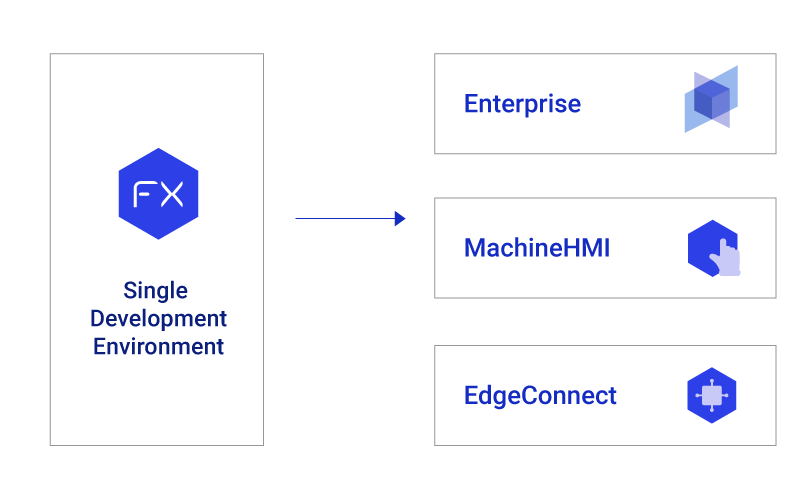
Which FrameworX edition do I need?
Enterprise – Full SCADA/IIoT platform for enterprise-wide visualization, orchestration, and scalability.
MachineHMI – Local visualization and control at the machine level.
EdgeConnect – Edge connectivity and intelligence for integrating devices and systems.
What is included in FrameworX SCADA?
Complete
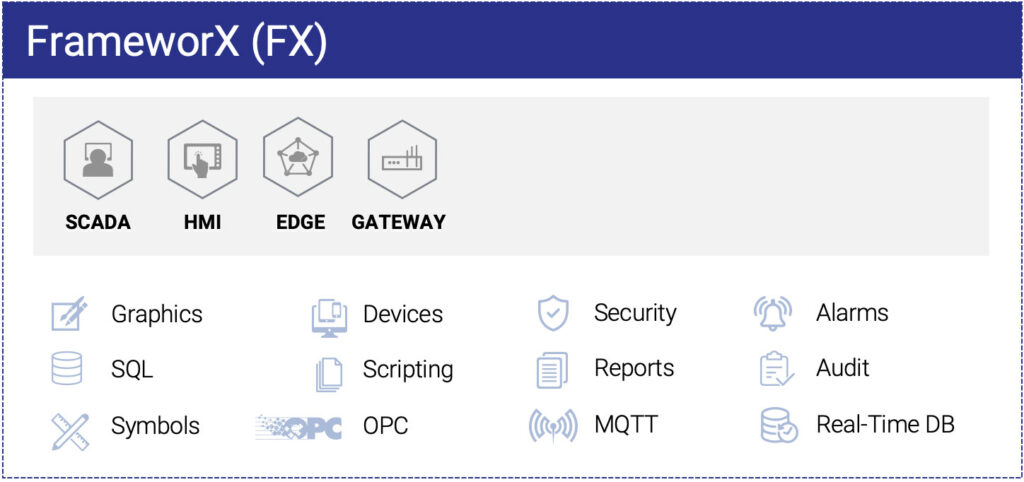
Every module included: Devices, Alarms, Historian, Reports, Scripts, Datasets, Security, DevOps tools. Every module ships in every edition, with full features and a single installer.
Multi-Platform Deployment
Single designer environment for all modules. WebAssembly deployment enables true portability – build once, run on desktop, web, and mobile without plugins or rewrites. Git-based DevOps with JSON export included.
Modern Foundation
Built on 100% managed .NET code with zero legacy constraints. Green-field design delivers proven performance: 1M+ tags/second processing, 1000+ concurrent clients, <30 second startup.
Unlimited by Edition
Every edition includes unlimited tags, clients, connections and screens.
Security & Redundancy
Designed to deliver mission-critical applications, Security at the core level.
Alarms and Notifications
Multiple alarm levels, logging, scripts. Notification by email, SMS. Acknowledge, display and act.
Great Use of Standards
SQL, OPC, MQTT, HTML5
Fast Development
Reusable symbols and components, projects stored in one secure file, built-in versioning.
Powerful Scripting
C#, VB.NET, Python, Javascript, Code Editor, Create Tasks, .NET Classes.
It’s not uncommon to hear, “This is like magic,” during Tatsoft training sessions when customers are upgrading from legacy solutions. Tasks such as design or troubleshooting can be completed in just one-tenth of the time with Tatsoft compared to traditional legacy systems.
- Control System Technologies
One of the main reasons we decided to work with Tatsoft is they have decades of experience in developing software products and understand the need to have a flexible, reliable platform on which to build applications that will last a long time.
- Renifer Systems
I can’t tell you how many people have come through this building. International groups are very interested. We like showing it off. The system is a big change from what we had; everybody appreciates it.
- Cargill Feed Safety Research Center
The other packages we looked at were either extremely long in the tooth, could only communicate with a single PLC, or were lacking in data collection capabilities (…) FrameworX also provides the tools for us to make complex animations that were essential for us to separate ourselves from the competition.
- Rite Irrigation LLC
Other key factors leading to our decision to use FrameworX were the wide range of options for displaying graphics, built-in .NET scripting for special requirements, communication flexibility, and competitive pricing.
- Water and Wastewater Industries
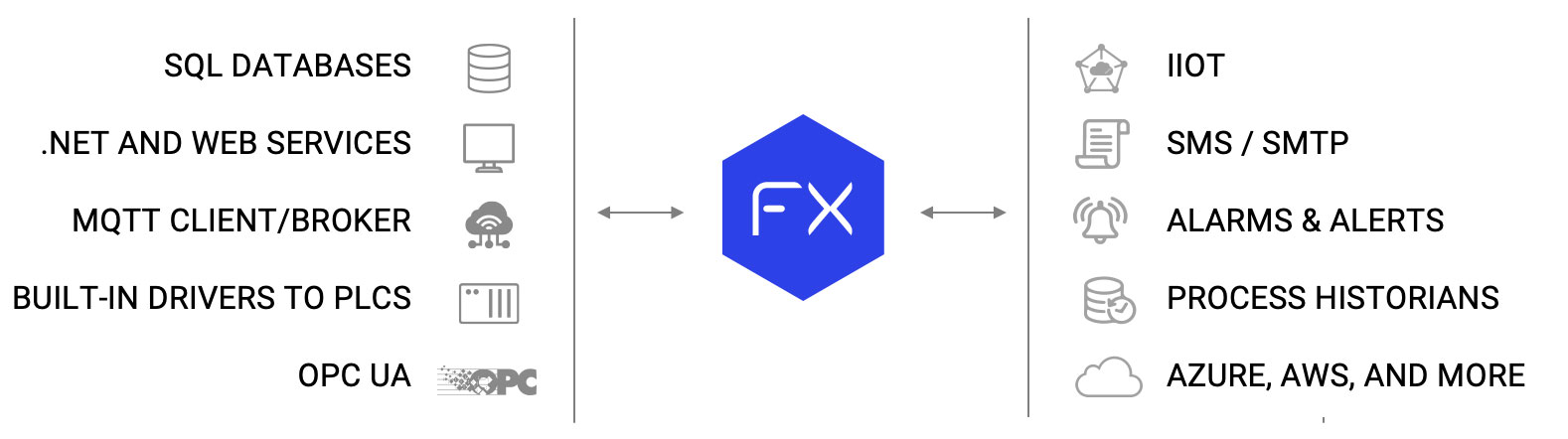
Connect to Anything with our SCADA Software
Flexible Secure Architecture Fits Your Application
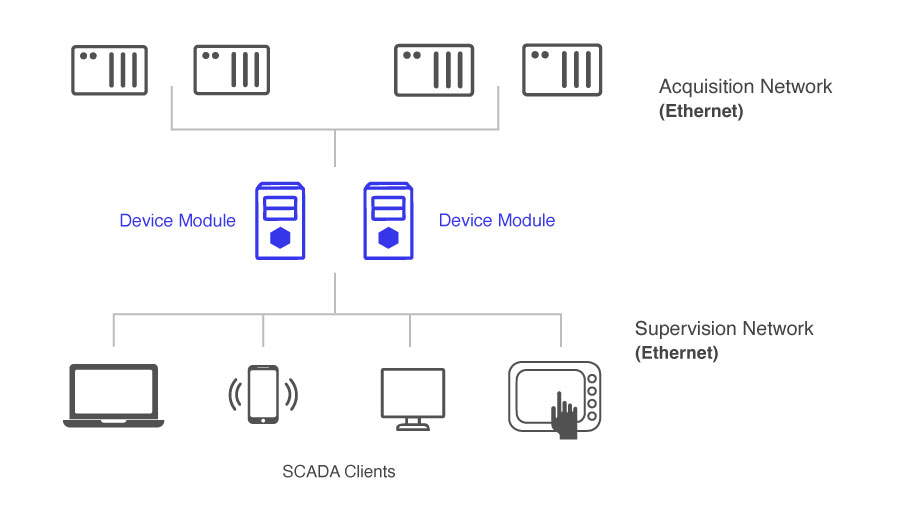
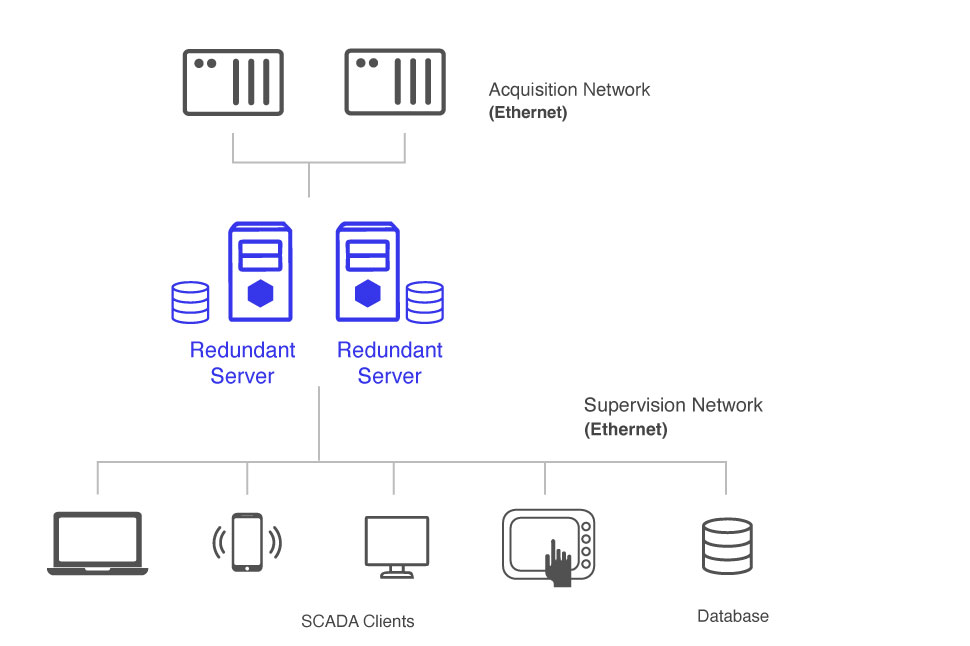
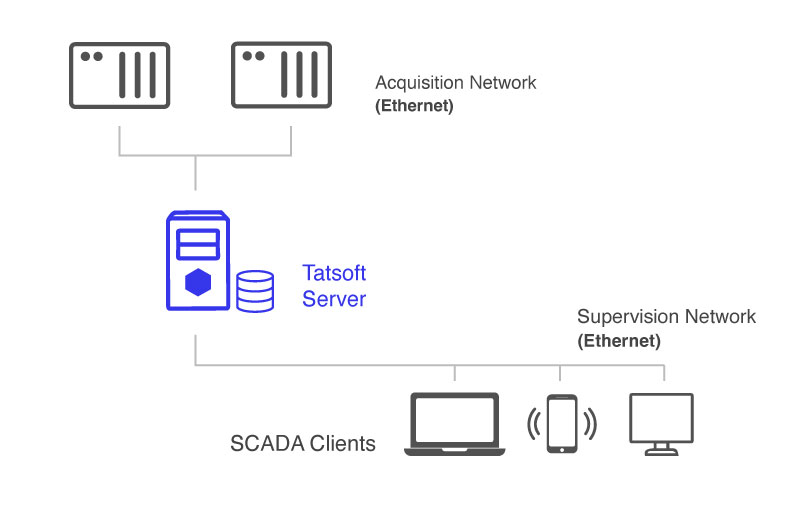
Tatsoft’s software is designed to be deployed to fit your needs. Server based design from one to many, you choose. Robust scenarios can include redundancy if required. Unlimited clients available as web deployed, full-rich clients, thin, and mobile.
Other SCADA Functionalities
- Alarm and Notification
- Complete & Multi Platform
- Dashboard Builder
- Built-In SQL
- SQL Historian
- Built-In Drivers
- Secure
- Audit Trail Anything
- Symbols and Components
- Robust and Fast
- Scripting
- Universal Connectivity
- Affordable Unlimited
- Licensing by Edition
- Redundant if needed
SCADA Software FAQs
SCADA software supervises and controls industrial processes in real time. It collects data from PLCs, RTUs and field devices, stores it as time-series history, presents it to operators as live displays and alarms, and passes it to enterprise systems. Modern SCADA adds edge processing, a unified namespace and web-based visualisation on desktop, browser and mobile.
An HMI is the operator-facing screen for one machine or one area. A SCADA system supervises many machines or sites, collecting and historising their data centrally. The practical difference is scope. FrameworX provides both from one platform and one data model, so a display built for a machine and a plant-wide supervisory view share the same tags.
Six criteria matter more than feature counts. How many devices the platform connects to natively, and whether that connectivity costs extra. Whether it subscribes to a unified namespace or copies tags into its own database. Which scripting languages it supports, and whether your engineers already know them. Whether displays reach browsers and mobile without a separate build. What the licence counts and charges for as the system grows. And which operating systems the runtime supports, including edge devices. FrameworX answers all six from one platform.
FrameworX offers EdgeConnect for edge connectivity and MachineHMI for machine-level applications, both sized for compact deployments on limited hardware, with the same drivers and scripting engine as the Enterprise edition. Alarms and historian are included in MachineHMI and in EdgeConnect View.
FrameworX includes more than 100 native device drivers, covering the major PLC and RTU families, plus OPC UA client and server, MQTT with Sparkplug B, Modbus, SQL databases and REST APIs. Connectivity is included in every edition rather than sold as separate modules, and the driver framework is extensible for custom protocols.
Yes. FrameworX is built on managed .NET code and runs on Windows, Linux, embedded devices and cloud infrastructure. The same project configuration deploys across all of them. Displays are delivered to a browser through WebAssembly, so operator screens run on desktop, web and mobile without plugins or separate builds.
FrameworX processes over 1 million tags per second and supports more than 1,000 concurrent clients, with startup in under 30 seconds. These are platform capacities rather than licence limits, because tags and clients are unlimited in every edition. Actual throughput depends on server hardware, network conditions and the number of devices polled.
Yes. FactoryStudio 8 and 9 projects upgrade to FrameworX 10.1, and every 10.1 minor release is solution-compatible with the ones before it. Opening an older solution upgrades the file in place and keeps the pre-upgrade file as an automatic backup, and the UpgradeSolution command-line tool runs the same upgrade unattended for scripted rollouts. Version 10.1.5 installs alongside 10.1.4 rather than replacing it, so the previous version stays available during a cutover.
No. FrameworX does not charge per tag. Local tags are unlimited in every edition, and the paid scaling axis is external I/O points and display clients. The three editions are EdgeConnect for edge connectivity, MachineHMI for machine-level visualisation, and Enterprise for plant-wide deployment. Every module, feature and 100+ connectors are included in each licence.
FrameworX is licensed by edition rather than by tag or client count. Each edition includes unlimited tags, clients, connections and screens, and every module, driver and feature ships in all of them, so the cost of a system is known before it scales rather than after. The three editions are EdgeConnect for edge connectivity, MachineHMI for machine-level applications, and Enterprise for unlimited plant-wide deployment. Current figures are on the pricing page.
Unlike legacy SCADA platforms built on proprietary runtimes, Tatsoft’s FrameworX uses a modern .NET 8 architecture with open APIs and native Python/C# scripting.
It runs seamlessly on Windows, Linux, and edge devices, supporting on-premise, cloud, and hybrid deployments.
Because all modules — graphics, historian, alarms, reports, and IoT — are part of one unified framework, developers avoid compatibility issues and gain the freedom to scale or embed their solution anywhere.
Tatsoft follows modern defense-in-depth principles, including user-role management, encryption, secure drivers, and Active Directory integration.
For high availability, FrameworX supports redundant servers, failover clients, and store-and-forward buffering.
The platform is compliant with industry best practices for cybersecurity and data integrity, helping users meet ISA/IEC-62443 and NERC CIP requirements.
Built-in auditing, encrypted communications, and version control further protect critical infrastructure.
Tatsoft offers comprehensive support and training programs for both integrators and end users:
- Online certification program
- Live or remote technical training
- Access to the Tatsoft Knowledge Base and user community
- Direct technical support (standard or priority)
- Quarterly solution-planning sessions for partners
This combination of education and engineering support ensures successful project delivery from proof-of-concept to full deployment.
You keep the engineering in the application and evolve the platform underneath. We read your application back to you object by object: tags, PLC addressing, alarms, history and every screen. The mapping of tags and addresses is automated and verified, and the screens are rebuilt on a plant model instead of copied. See how the migration works: https://tatsoft.com/migrate-to-frameworx/
Displays and scripts are rebuilt rather than converted, which is normal when moving between platforms from different vendors. What carries across without rework is the field layer: FrameworX connects to the same controllers through more than 100 native drivers plus OPC UA, Modbus and MQTT with Sparkplug B, so device communications are reconfigured rather than replaced. Tag structures can be imported from a spreadsheet export, and the two systems can run in parallel against the same controllers during validation.