Ask any SCADA engineer how they actually spend their time on a project and the answer is always the same. A typical project has 500 to 2,000 tags. Every one gets named, typed, scaled, alarm-configured, historian-enrolled, and documented. Then you wire it all to displays, bind data points, configure device channels and protocol nodes. That work is not engineering. It is data entry. And in my experience, it consumes 40 to 70 percent of total development hours on a typical project.
AI tools have entered the automation space with real promise around this problem. Most deliver something useful: natural language answers to documentation questions, faster searches through vendor manuals, help with scripting syntax. But the market has not drawn a distinction that matters a great deal to engineering teams evaluating these tools.
There is a difference between AI that analyzes industrial systems and AI that builds them. That distinction determines whether AI changes your project timelines or just changes how you look things up.
What Analysis Looks Like
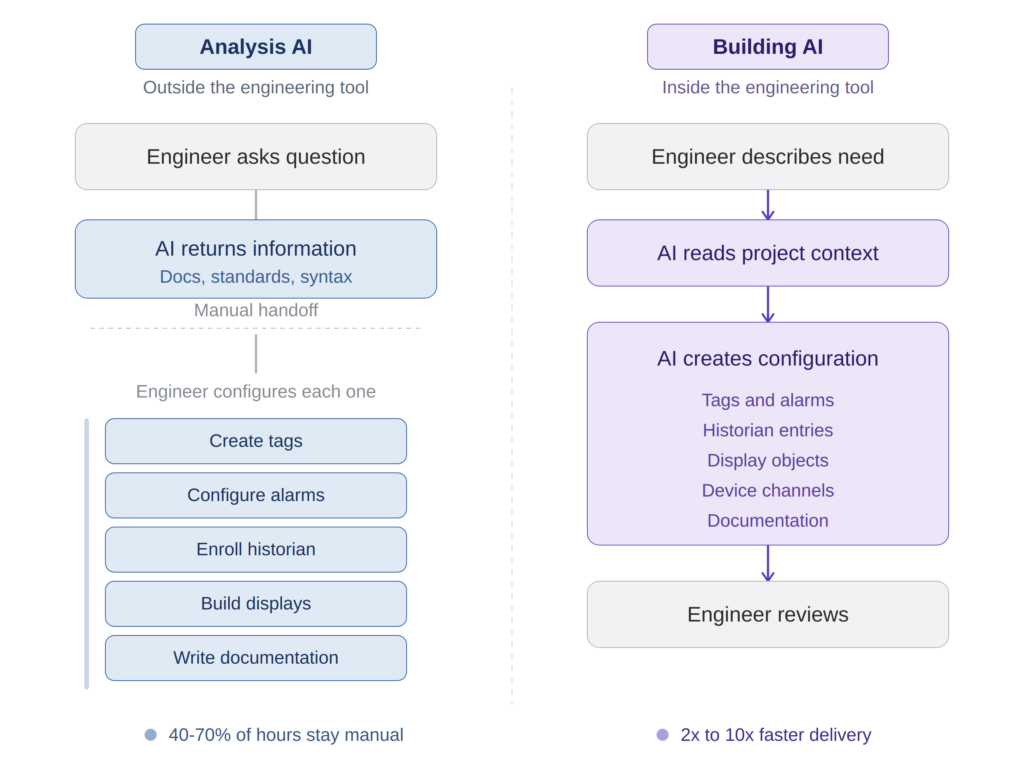
Analysis AI sits outside your engineering environment. You describe a problem, it gives you information. Paste in a script, it finds the bug. Ask about ISA-88 state models, it explains them. These are real capabilities, and they make experienced engineers faster at the thinking part of the job.
The limitation is structural: you still have to build everything yourself. Every tag, every alarm, every display element, every script still requires a human being to open the configuration tool and enter values one at a time. The AI helped you think faster. It did not help you build faster.
For complex control problems, the kind where experienced engineers earn their keep, analysis AI is a legitimate accelerant. But for the work that actually consumes most project hours? The repetitive, mechanical configuration that experienced engineers do in their sleep? Analysis AI barely moves the needle.
What Building Looks Like
Building AI operates inside the engineering environment. It reads your project structure, understands what already exists across the project’s Unified Namespace, and creates new configuration directly. You describe what you need in plain language and the AI writes it into the live project, not as generic code you adapt, but as valid, platform-native configuration that appears in your IDE in real time.
FrameworX AI Designer, which we built at Tatsoft, works exactly this way. It uses the Model Context Protocol (MCP), an open standard developed by Anthropic, to give AI models structured access to the full FrameworX object schema. But the MCP integration is not a thin wrapper around a few API calls. It is two purpose-built services: a live IDE co-pilot that connects to the running Designer with 18 tools covering the full solution lifecycle, and an offline file engineering service that generates configuration from specifications without a running instance.
What makes this architecturally different from most MCP implementations is how the AI learns the platform. We built a progressive knowledge delivery system: architecture concepts load on connection, module schemas load on first access, field-level guidance arrives with each schema fetch, and build playbooks load on demand. The AI receives exactly what it needs at the moment it needs it, not a massive prompt dump at session start.
The MCP Category system creates a clear collaboration boundary: AI-created objects are tagged and fully modifiable by AI. Engineer-created objects remain under human control, with AI limited to annotating the Description field unless the engineer explicitly re-enables full AI access. Every tool call produces immediate visual changes, an orange border and “AI Designer” badge make the AI connection visible, so the engineer always knows what is happening.
The Productivity Evidence
Engineers using FrameworX AI Designer report productivity improvements of 2x to 10x for configuration tasks, depending on the project complexity, the engineer’s comfort level with AI collaboration, and their existing platform knowledge.
The range is wide because the variables matter. A senior engineer who already knows the platform well and is working on a complex, non-repetitive control problem will see a 2x improvement. A mid-level engineer working on a configuration-heavy project with repeating patterns will see much more.
During a live workshop at ProveIT Conference in Dallas, participants were challenged to create a complete automation application for a fast-food restaurant within 72 hours. Eduardo Bogo, a Tatsoft engineer working with AI Designer, built an equivalent solution, a pizza restaurant with full tag hierarchy, alarms, historian, displays, and device configuration, in 2 hours. During the FrameworX AI Designer launch, we demonstrated this live. The full recording is on the Tatsoft YouTube channel: AI Built a Complete SCADA System Live — FrameworX AI Designer Launch (youtube.com/watch?v=p6xp-38oWtQ).
72 hours versus 2 hours. That kind of difference changes how industrial applications get built.
The Workflow Shift
What changes is not just the schedule. When AI handles tag creation, alarm configuration, historian enrollment, and display layout in one orchestrated sequence, the engineer stops thinking about naming conventions and data entry. They start thinking about process behavior, edge cases, operator experience.
The real change is not speed. It is that workflows which previously required too much specialized knowledge to attempt are now part of everyday operations. Plant managers audit an entire application and ask the AI to report on compliance against their standards. Operations teams define specifications and have the AI generate, review, and validate work against them. These are things that did not happen before, not because people did not want them, but because the manual effort made them impractical.
What I have seen this change most is team composition. A junior engineer with six months of platform experience, working alongside an AI that carries deep platform knowledge through a portable Skills system, produces work that previously required senior oversight. The junior engineer did not get smarter overnight. The AI carries the institutional knowledge that senior engineers accumulate over years and makes it available at every step.
For system integrators, this shifts project economics. A project that required three senior engineers runs with one senior directing the work and two juniors executing with AI assistance. Margins improve. Capacity scales without proportional headcount growth.
What to Evaluate
If you are evaluating AI tools for industrial automation development, here are the questions that separate analysis from building:
Does the AI know your actual project, or just the general domain? A tool that understands the generic concept of a SCADA tag is different from one that knows your specific platform’s properties, types, validation rules, and naming hierarchy. One gives you information. The other creates correct configuration.
Does it write directly into your project? Copy-paste workflows between an AI chat window and an engineering tool are better than nothing, but they reintroduce manual work and error at every handoff. True building AI operates inside the tool, changes appear in your IDE as the AI works. Look for live visual feedback that shows you what the AI is doing.
Does it understand context within your project? When you ask it to add alarms to a motor control block, does it inspect the existing tag hierarchy, check naming patterns, and generate alarms consistent with what is already there? Or does it produce a generic template you have to adapt? Context-aware generation is what prevents the AI from creating configuration that conflicts with existing work.
Does it know your protocols? Industrial systems live and die by communication drivers. The AI should find the right protocol by vendor name, configure channels and nodes with correct addressing, and set up the data points. Protocol intelligence, not just tag manipulation, is where building AI earns its keep.
What happens to documentation? This is where most projects accumulate debt. Engineers defer documentation under project pressure, and it either never gets written or gets written poorly after the fact. Building AI that generates documentation as a natural byproduct of construction solves this structurally, not through discipline.
A Practical Example
A controls engineer at a water treatment facility needs to add monitoring for a new chemical dosing system. The system has 12 instruments: flow meters, pH sensors, turbidity monitors, chemical level sensors. Each needs a tag with proper ISA-95 hierarchy naming, an alarm with deadband appropriate to the measurement type, a historian entry at the right sample rate, and a display object on the existing operator console.
With analysis AI, the engineer gets help understanding alarm prioritization standards for chemical dosing, maybe some naming convention guidance, possibly a script template. Then they do the configuration work: 12 tags, 12 alarms, 12 historian entries, 12 display objects, all by hand.
With building AI, the engineer describes the dosing system in natural language, references the existing project structure, and tells the AI to add the 12 instruments following established patterns. The AI reads the project, checks the existing tag hierarchy, creates tags named correctly within the ISA-95 structure, configures alarms with appropriate deadbands for each measurement type, enrolls historian entries, adds display objects bound to the correct data points, and connects everything to the appropriate device channel. The engineer reviews, adjusts anything site-specific, and moves on. Documentation for the new section exists because the AI generated it during the build.
The time savings are real. But the bigger win is that the engineer spent their time thinking about the process, not fighting the configuration tool.
Where the Industry Is Headed
AI that builds rather than just analyzes is not a feature you bolt onto an existing SCADA platform. It requires rethinking how a platform exposes its object model to external intelligence. The decisions that enable it, consistent namespaces, managed code, open interfaces, structured schema delivery, are architectural decisions that take years to get right.
The platforms making these architectural decisions now will have a compounding advantage. Every improvement in AI models automatically makes these platforms better, because the structured access is already in place. Platforms that treat AI as an external chatbot will need to re-integrate with every advance. The gap will widen, not narrow.
The Model Context Protocol is one path. Other platforms will find their own. But the platforms that give AI genuine, structured access to project internals will produce fundamentally different development economics than those that treat AI as a consultant standing outside the building.
For engineering teams evaluating platforms today, the question is not whether a platform has “AI integration.” It is what that integration actually allows the AI to do. Does it build, or does it only talk?
Complex control problems will always require expertise, judgment, and process knowledge. AI does not replicate that. But the mechanical work of translating expertise into configuration, the work that consumes most of every project, that is where AI-native platforms are already changing the math.
An AI that truly understands industrial automation projects, SCADA configuration, tag structures, alarm logic, device protocols, brings benefits well beyond system integration engineering. Plant managers, operations teams, maintenance staff, compliance officers all become direct beneficiaries when the AI that built the system also understands how to explain it, audit it, and extend it. But that is a discussion for another article.
Author Bio
Marc Taccolini is the CEO of Tatsoft, a SCADA and industrial automation software company. He has spent more than three decades building industrial software platforms and working with system integrators and engineering teams across manufacturing, energy, water, and infrastructure. Tatsoft’s FrameworX platform has over 30 years of development history and is deployed in more than 5,000 installations worldwide. Learn more at tatsoft.com.