How MCP and Native .NET Namespace Exposure Enable AI-Driven Development
For systems integrators and system engineers, the traditional bottleneck in industrial automation is not technology. It is engineering hours. Every SCADA and IIoT project requires the same labor-intensive tasks: modeling the process in a tag namespace, configuring communication drivers, building HMI screens, and setting up alarm and historian schemas. These tasks demand skilled engineers who understand both the process and the platform.
The newest FrameworX update introduces a different approach by exposing its entire architecture, every .NET namespace, every Designer API, every configuration object, to AI agents via the Model Context Protocol (MCP). This is not AI-assisted development where a chatbot suggests code snippets. This is Autonomous Engineering, where the AI builds working configurations directly from natural language specifications.
FrameworX AI Designer is the production implementation of that approach. Engineers connect Claude or other AI agents directly to the Designer IDE and build SCADA/HMI solutions through natural language, with every change appearing in real time. The difference between AI-assisted and Autonomous Engineering comes down to access. Platforms that bolt chatbots onto closed architectures provide suggestions. FrameworX, with its unified architecture and MCP integration, gives AI agents the ability to read and write the same configuration objects that define your runtime, enabling direct execution of engineering intent.
WHERE SCADA ENGINEERS SPEND THEIR TIME
Understanding where engineering hours go on a typical project explains why AI integration at the configuration level produces outsized results. A skilled SCADA engineer spends 60 to 70 percent of project time on repetitive, mechanical tasks rather than solving the actual process problem.
| Task Area | Typical Effort | What the AI Does |
| Tag configuration and database building | 20 to 30 percent of project time | Generates ISA-95 compliant tag hierarchies from a description of your facility. A 500-tag database that takes two days takes 30 minutes. |
| Screen and display development | 25 to 35 percent | Builds displays from natural language descriptions, wires them to tags, applies High Performance HMI principles by default. |
| Alarm configuration | 10 to 15 percent | Suggests alarm limits based on industry standards, generates ISA-18.2 compliant messages, flags missing deadbands. |
| Scripting and logic | 15 to 20 percent | Writes scripts from behavior descriptions, documents them, saves them as reusable parametric components. |
| Historian and reporting | 5 to 10 percent | Recommends what to log based on equipment type, generates reports and trend configurations. |
| Testing and debugging | 10 to 15 percent | Audits the project, flags issues before commissioning, generates test plans. |
| Documentation | 5 to 10 percent (often skipped) | Generates tag dictionaries, alarm rationalization, screen descriptions as a byproduct of the build process. |
The FrameworX AI Designer addresses every one of these task areas. Project timelines are reduced conservatively by 40 to 50 percent. That is the direct result of eliminating the repetitive, mechanical work that consumes most of a SCADA engineer’s development hours.
THE ARCHITECTURAL FOUNDATION: THREE VIEWS, ONE MODEL
FrameworX is built on a unified data architecture where every object exists in three synchronized forms:
- Config Tables are the JSON and database definitions. What MCP tools use for import and export operations. What you write_objects to.
- Runtime Namespace is the live instance at runtime. What tags, scripts, and expressions read from. Tag.Plant1/Boiler/Temperature returns the live value.
- Designer UI is the visual editor. What a human clicks through. Each tab and page in Designer maps to one config table.
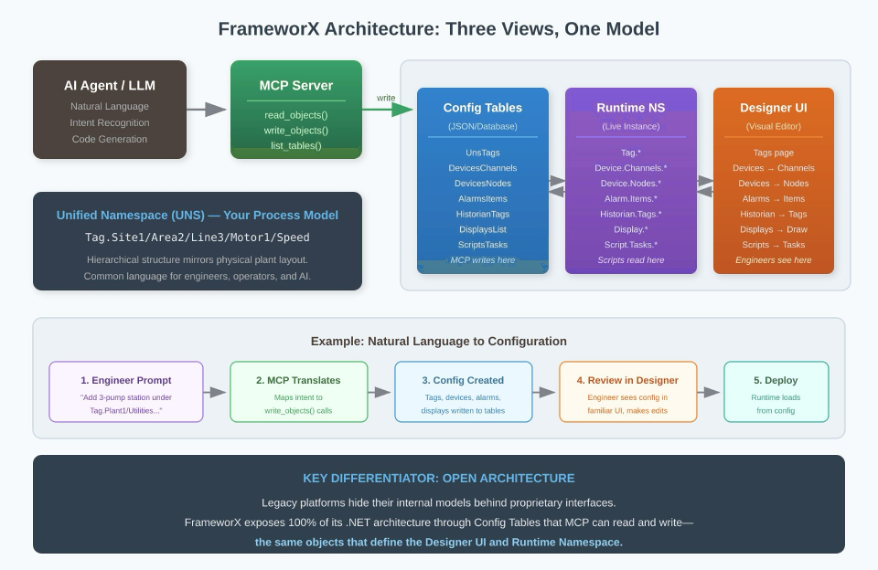
Figure 1: MCP enables AI agents to access FrameworX config tables and runtime namespaces directly, transforming natural language into working configurations.
This means when you execute write_objects(table_type=’DevicesChannels’, data=…), it produces the same result as manually filling in the Devices, Channels grid in Designer. At runtime it appears under Device.Channels.*. One object, three names, complete consistency. This is why AI can do real engineering work on FrameworX and cannot on platforms with closed, proprietary object models.
Why Open Architecture Matters
Most SCADA and IIoT platforms treat their internal object models as proprietary. If you want to automate configuration, you are limited to vendor-specific import tools or custom scripting against undocumented interfaces. AI integration typically means sending data out to external services, adding latency, complexity, and security considerations.
FrameworX takes a different approach. Because the platform is 100% managed .NET with a consistent three-view architecture, MCP provides AI agents with the same access an engineer has through the Designer UI. The AI does not need special adapters or translation layers. It works directly with the same config tables that define your runtime.
Module Architecture: Config Tables to Runtime Namespaces
| Module | Config Tables | Runtime Namespace | Designer UI Tab |
| UNS | UnsTags, UnsTagProviders | Tag.* | Tags page, TagProviders page |
| Devices | DevicesChannels, DevicesNodes, DevicesPoints | Device.Channels.*, Device.Nodes.*, Device.Points.* | Devices: Channels, Nodes, Points |
| Alarms | AlarmsItems, AlarmsGroups | Alarm.Items.*, Alarm.Groups.* | Alarms: Items, Groups |
| Historian | HistorianHistorianTags, HistorianStorageLoc | Historian.Tags.*, Historian.Storage.* | Historian: Tags, Storage |
| Displays | DisplaysList, DisplaysSymbols | Display.*, Display.Symbols.* | Displays: Draw, Symbols |
| Scripts | ScriptsTasks, ScriptsClasses | Script.Tasks.*, Script.Classes.* | Scripts: Tasks, Classes |
| Security | SecurityUsers | Security.Users.* | Security: Users |
When an AI agent connects via MCP, it reads and writes to any of these config tables, achieving the same results as an engineer working in the Designer UI, but programmatically and at scale.
1. The AI-Powered Designer
FrameworX AI Designer is available now. You describe the solution. FrameworX builds it.
The enabler is the Model Context Protocol. MCP gives AI agents direct read and write access to every FrameworX configuration object, the same objects you access through the Designer UI. This is not a chatbot generating suggestions for you to manually implement. The AI executes your intent directly. Tags, screens, alarms, historian entries, scripts, and communications are built from a single prompt and appear in the Designer in real time, visible, editable, and ready to deploy.
From a Single Prompt to a Running System
Describe your facility and equipment. The AI generates a structured tag hierarchy using your naming conventions, applied consistently from the first tag to the last. Tags carry semantic meaning rather than device-relative addresses. Your semantic model is consumable by external data sources and publishable to any connected system, so every downstream integration receives data it understands without remapping.
Describe a display and the AI builds it, wires it to the correct tags, and applies High Performance HMI principles by default, with full flexibility to design however your project requires. Describe a behavior and the AI writes the script, documents it, and saves it as a reusable parametric component. Describe your alarm requirements and the AI generates ISA-18.2 compliant configurations with appropriate deadbands. Describe your historian needs and the AI configures logging and trending.
Tag dictionaries, alarm rationalization, and screen descriptions are generated as a byproduct of the build. Documentation exists because the process produces it, not because someone found time to write it.
Example: “Add a 3-pump station under Tag.Plant1/Utilities/PumpStation2. Each pump has a Yaskawa VFD with speed, current, fault status, and run command. Connect via Modbus TCP at 192.168.1.50. Use our standard pump faceplate. Alarm on any fault or current above 15A.”
The AI produces 12 UNS tags with correct data types, a Modbus TCP channel, three device nodes with register mappings, fault and high-current alarms for each pump, and three pump faceplate instances bound to their tags. The engineer reviews, adjusts, and deploys.
The Compounding Advantage
Every project builds an organizational library of reusable, documented components. Project two benefits from everything project one created. Junior engineers produce senior-quality configurations. Senior engineers spend their time on architecture, not repetitive setup. New engineers become productive in days.
The numbers reflect this directly.
| Task | Traditional | With AI Designer | Savings |
| 500-tag database | 2 days | 30 minutes | ~15 hours |
| 20-screen project | 3 weeks | ~1 week | ~80 hours |
| Project documentation | 3 to 5 days | Auto-generated | ~30 hours |
| Typical mid-size project | ~8 weeks | ~3 to 4 weeks | 50% labor |
At a conservative 40 to 50 percent time savings, a $150,000 project labor cost becomes $75,000 to $90,000. The platform pays for itself on the first project. The gap between FrameworX teams and everyone else grows with every project delivered.
2. The Platform Architecture
The reason a single prompt produces a complete, deployable solution is architectural. Every object in FrameworX exists in three synchronized forms: a config table that MCP exposes to AI agents, a runtime namespace the live system executes, and a Designer UI tab the engineer reviews. When the AI writes a device configuration, it appears in the Devices grid and executes at runtime. One operation, three views, complete consistency.
This is why AI builds real solutions on FrameworX and cannot on platforms with closed, proprietary object models.
Flexible Data Modeling
FrameworX includes a native Unified Namespace that gives you a flexible, open way to model and structure your data. You define the hierarchy that reflects your operation, by site, by equipment class, by process area, or any combination. ISA-95 structures are supported. Tags carry semantic meaning rather than device-relative addresses. Your semantic model is consumable by external sources and publishable to any connected system, making every integration cleaner and every AI-generated configuration immediately useful downstream.
Open Connectivity
FrameworX includes connectors for OPC-UA, MQTT, REST, SQL, and hundreds of industrial devices and systems, among many others. Connect to any device, any MES, any ERP, any quality system, without proprietary middleware. The AI maps device registers to UNS tags and reads uploaded PLC documentation to generate tag imports directly.
Deployment
FrameworX runs on-premise, at the edge, or as a central SCADA server. Every capability, including AI, ML, historian, alarming, and scripting, runs fully at the edge or on an OEM skid with no dependency on a central server. OEMs ship AI-capable machines without requiring specific infrastructure from their end customer.
Built-in MQTT Broker
FrameworX includes a built-in MQTT broker, making it a natural data hub between your OT and IT environments. It collects from PLCs and field devices, contextualizes data into your UNS structure, and publishes to any connected system, historian, MES, ERP, or MQTT subscriber, without separate middleware.
Security
Your process data stays in your environment. The AI operates entirely within your local infrastructure. Nothing transmits externally unless you configure it to. AI agents are subject to the same role-based permissions as any human user in the Designer. Role-based access control, encrypted communications, and audit trails are built in. IEC 62443 alignment is a design consideration, not a retrofit.
Legacy Migration
The cost and risk of migration keep most organizations on platforms they have outgrown. FrameworX AI Designer reduces that cost substantially. The AI imports existing tag databases from CSV, XML, and OPC exports, restructures them to your target namespace, and identifies dead configuration, tags and screens that exist in the legacy system but are no longer used. A migration that typically requires 12 to 18 months compresses significantly. Your legacy system becomes source material.
3. Runtime Intelligence
FrameworX does not stop at commissioning. AI, ML, and MCP remain active in the running system, adding intelligence to operations from day one.
Native Machine Learning
ML models run inside the FrameworX runtime using ML.NET or Python natively. No external environment, no cloud service, no separate integration layer. SCADA engineers train models against historian data and deploy them directly, without leaving the platform. Predictive maintenance, batch quality prediction, energy optimization, and many other ML applications are within reach of the team that built the system, using data they already collect.
Adaptive Operations
The AI connects to live runtime data. Alarm strategies adapt to operating conditions rather than relying on static limits. Anomaly detection identifies process deviations before they reach alarm state. Operators receive context with every alert, what the condition means and what the recommended response is, based on current process state.
Natural Language Historian Queries
Process engineers and operators query historian data in plain language. “Show me every instance in the last 90 days where Line 2 yield dropped below target and what the upstream conditions were” returns a result without SQL, without a reporting tool, without IT involvement. Shift reports, batch records, and compliance reports generate automatically from process data.
Change Management and Multi-Site Consistency
Configuration changes are tracked with semantic context. Before a change deploys, the AI identifies downstream impacts and generates Management of Change documentation automatically. Across multiple sites, template governance keeps naming conventions, alarm philosophy, and screen standards consistent. The AI surfaces performance differences between sites and identifies the operating parameter differences behind them.
Pre-Commissioning Validation
AI-generated process simulation lets you test the complete project before the first cable is connected. Issues that would surface during commissioning surface in simulation instead, where they cost time rather than travel, rework, and schedule.
BENEFITS
| Benefit | Detail |
| Faster project delivery | Repetitive configuration tasks completed in minutes. Engineers focus on process and architecture. |
| Consistency at scale | AI-generated configurations follow your naming conventions and standards every time, across every engineer and every project. |
| Lower barrier to entry | Engineers new to the platform describe what they need in plain language while learning the underlying architecture. |
| Full visibility | Everything the AI creates appears in the standard Designer UI. No black boxes. Review, modify, and deploy with confidence. |
| Predictive operations | ML models running natively predict equipment failures, quality outcomes, and energy use without cloud dependency. |
| Knowledge retention | Institutional knowledge captured in the project, not in people. Survives turnover and retirement. |
| Reduced migration cost | AI-assisted legacy migration compresses timelines significantly. Dead configuration identified and eliminated. |
WHY OTHERS CANNOT FOLLOW
Legacy platforms cannot do what this document describes. The limitation is not a missing feature scheduled for the next release. It is structural. Platforms built on closed, proprietary object models cannot give AI agents the access required to do real engineering work. They generate suggestions and partial configurations, but total execution still falls to the engineer.
FrameworX was built on a unified architecture where every configuration object is readable and writable through a single consistent interface. MCP connects AI agents to that interface directly. This was not an accident. FrameworX was designed from the ground up with AI integration in mind, built on open architecture so that AI agents, engineers, and external systems all work from the same configuration layer. The result is a platform where your intent becomes a running system, where every project makes the next one faster, and where operations improve continuously rather than degrading toward the next upgrade cycle.
For Systems Integrators
- Deliver projects in half the time at higher quality
- Auto-generated documentation exists at project close, not months later
- A reusable component library that compounds in value with every engagement
- Consistent configurations across every engineer and every project, regardless of experience level
For OEM Machine Builders
- Ship AI-capable machines without requiring specific infrastructure from your end customer
- Differentiate your product with native ML and runtime intelligence built into the skid
- Reduce engineering time per machine build with reusable, AI-generated configurations
- Offer predictive maintenance and performance analytics as a standard product feature, not an add-on
For Plant Directors and IT/OT Executives
- Process knowledge stays in the platform when senior engineers retire or move on
- Operations that surface problems before they become failures, without a data science team
- A migration path off legacy systems that is cost-justified for the first time
- Full visibility into every AI-generated configuration, no black boxes, no vendor dependency
For Operations and Process Engineers
- Query years of historian data in plain language, no SQL, no IT ticket, no reporting tool
- Receive context with every alarm, what it means, what to do, based on current process state
- Access shift reports, batch records, and compliance documentation generated automatically from process data
- Work in displays built for operators by default, designed to make abnormal situations unmistakable
The gap between what FrameworX teams deliver and what everyone else delivers is not a matter of working harder or hiring better engineers. It is a matter of what the platform makes possible.
We did not bolt on a chatbot. We gave AI a seat at the engineering desk.
tatsoft.com | [email protected] | FrameworX AI Designer
Say It. Build It. Run It.