By Marc Taccolini, Founder and CEO, Tatsoft
This piece condenses the full article on Substack, which adds the engineer’s own account of the two builds, with and without the repository and skills published in the GitHub FrameworX-Projects repository.
In the article A business has source code too, I commented on the over 21,000 prompts that had Claude Code acting on (A) business management, and said a follow-up article would explore the other two use cases: (B) apply AI to assist product development and quality assurance (success metric: 700+ custom QA solutions created this year), and (C) integrate AI in the FrameworX product itself (success metric: the Designer MCP allowed a 100+ HMI screen competitive upgrade in a weekend). In this article, I take on the (B) and (C) use cases.
Starting with what did not work in the first effort to have the AI draw HMI screens autonomously. The screen was supposed to be a bottling line. What it showed instead was three colored rectangles, text boxes floating beside them, and an empty alarm grid. It used only a small fraction of what our MCP integration was giving the AI to work with, and an unusable outcome.
When the agent built that, nothing was missing from its toolbox or from the MCP descriptions: it could reach every object in the design, create tags, wire alarms, write scripts, lay out screens, with dozens of advanced controls, dynamic properties, and hundreds of symbols in the library. The problem: it had never seen a good bottling line; from the AI’s point of view, it was its very first project.
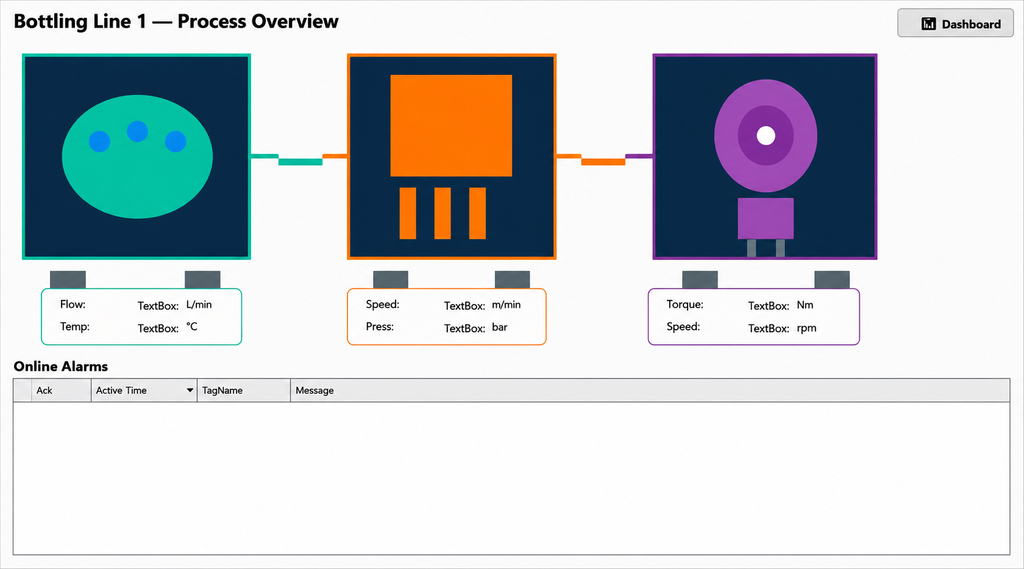
The bottling line as the agent first built it. Unusable as it is.
Capability was never the missing piece
A control engineer doesn’t lay out a bottling line from the object reference. They lay it out from years of watching operators use screens at three in the morning: which values belong together, which alarm text names what is at risk rather than which tag went out of range. None of that is in the MCP role descriptions, and an agent with complete access to the object model has none of it.
We already knew this from source code
We have lived the same thing in software for thirty years. A source code repository is never only the programming language statements. It carries the architecture notes, the conventions, the reasons a thing is the way it is, the pattern somebody worked out years ago and wrote down so nobody had to work it out again. Strip that away and a new engineer is slower even with full access, or drifts easily to a messy implementation.
We had given the agent the equivalent of puzzle pieces with no clear final result quality metrics. So we built the missing half: a repository holding that layer for industrial solution work, written to be navigated by an agent rather than read front to back. Conventions, patterns, a build order, worked examples, verification steps, and files that record where objects actually sit on a screen. Further, a framework prepared to learn and evolve as each new project or requirement is fed in.
The same job, done twice
One of our engineers tried it both ways on the job customers hand us constantly: here is a PDF of our process, build us the screen.
Built in a plain folder with the MCP tools and limited context, the result is a “reasonable starting point”; done in the properly set up environment, the result turns out to be “close to final production”. Built inside the repository, it reproduced the diagrams with correct symbols, correct connectors, the same layout and organization as the drawing, the PDF drawing reproduced with high fidelity on the UI. The explanation: the repository pulls in the relevant procedures on its own, and it carries the written practice, including the files that record where each object belongs.
The honest caveat: a few project examples, with generic HMI rules, take you up to a certain level. The more knowledge you feed into the repository, the smarter it gets. Along with this article, we publish on GitHub a repository, FrameworX-Projects, to act as a seed for your own environment. Let it evolve with every project you do, and expect Tatsoft to publish specific vertical skills over time.
Driving the object model, not clicking the screen
When we built AI into our own engineering tool, we had the agent drive the product’s object model directly, not click a simulated screen or replay keystrokes. Current AI tools can emulate navigation and clicks on a web browser; sorry to be blunt, but that is a terrible way to develop engineering applications: it is slow, token-hungry and, the critical limitation, it does not have real understanding of the platform capabilities and schemas. The FrameworX Designer MCP tools have an infrastructure that literally teaches the AI about the platform (patent pending); the integration is at the engine level, but keeps the UI output. It means every action goes through the interface the product uses on itself, and every result stays visible to the engineer, who can learn with it and change it. An emulation that clicks a screen follows its UI labels, with no real architecture understanding; when the AI is driving the object model, it produces consistent configuration and the UI follows the object modeling, not the opposite.
Console tools for graphical development? Yes, still important
AI driving a user interface is an amazing learning tool, but slow when the AI gets it wrong by itself. The Designer MCP tools (visual) have a sibling, the Console MCP, that can create full FrameworX solutions (UNS with tags and user types (UDTs), alarms, historian, field device connections, scripts, database connections, reports, user interfaces) working directly on the solution files, running dozens of parallel threads when necessary.
What that buys at volume
Our QA process validates each product item by building a custom industrial application for it. Over the last six months that is 773 custom applications, built purely to test our own software. Without the automation it is not realistic to aim at 100+ solutions a month, so before this we had rationed or simplified them, and what you ration, you under-test.
One brief asked for a tutorial application with PID control. What came back was the loop tuning screen, the PID calculation underneath it, the process model, the disturbance cases and the performance metrics. Not a picture of a control loop. A working control loop HMI solution. The entire process took under 20 minutes.
Knowledge is what makes that output worth validating. Alongside the repository, the agent searches about 700 pages of our documentation, partitioned so tutorials, how-to guides, reference and concept pages are separate kinds of page, following the Diátaxis guidelines, and the retrieval lands on the right sort of answer.
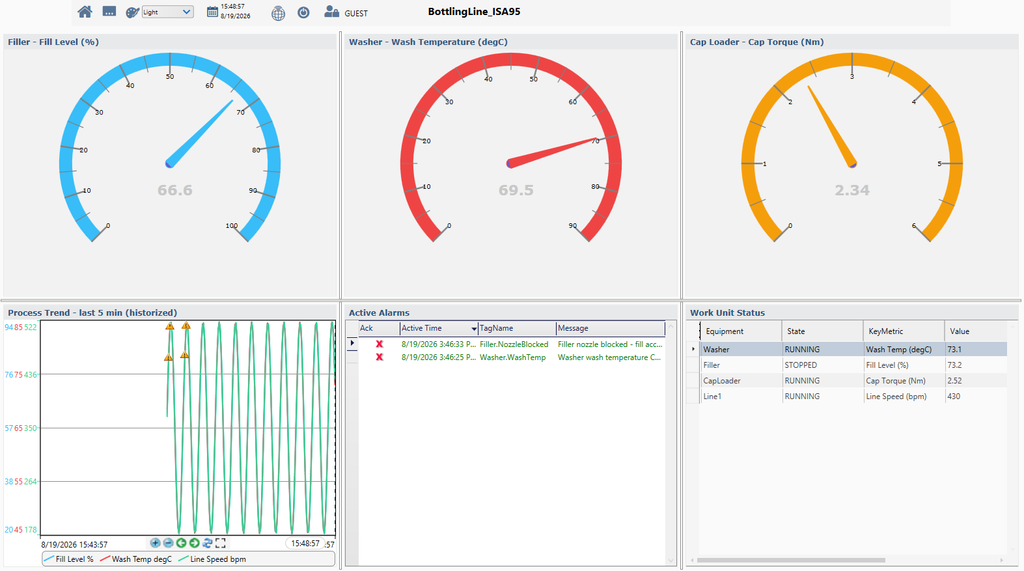
The same line built later. Months of work sit between the two screens, on the platform, on what the agent could reach, and in the repository, so read them as before and after, not as a controlled comparison.
A repository is a knowledge environment
The mistake is easy to make and I made it: a repository is not just source files plus a guidance file stating the house rules. That was my view when I started to work with Claude Code; it is not incorrect, but it is misleading, because a repository is supposed to be far more than that.
A well-designed repository becomes a knowledge domain, with progressive information fed according to the workflow, and with symbolic definitions and deterministic processes gating the LLM model’s execution and shaping the behavior of the tasks intended for that workspace. The files doing the most work in ours don’t compile.
A prompt on its own has the prompt, the model’s defaults, and whatever files you thought to attach. The same prompt inside a structured knowledge environment is guided by everything that environment already knows, and you didn’t have to anticipate any of it.
Same engineer, same brief, same model. One prompt ran on its own. The other ran inside something that already knew what a good display looks like.
The first wave of our AI integration added it to our product platform and to our internal technical process, and focused on the MCP tools, the prompts, the descriptions and context management. That was useful, but not enough. The second wave, focused on the workspace’s knowledge and on having standard processes guide and gate the AI models and tools, is where the best results were collected.
Test this rather than believe it
Build your deliverable from a workspace carrying your own conventions and symbol standards, and verify the improvement on the output, and that difference is the only argument here worth anything. The repository we built for industrial solution work is public: https://github.com/tatsoft-llc/FrameworX-Projects. The underlying software development tool, FrameworX, is free to download and to develop solutions with; request it at https://tatsoft.com/fx-101/#download. The full circle.
Author Bio: Marc Taccolini brings three decades of industrial software experience as designer of Tatsoft FrameworX and previously InduSoft (now AVEVA Edge).
*Aim High. Start Simple. Scale Without Limits.