FrameworX Platform | Industrial Automation Software
The Modern SCADA Platform. Built on .NET. Unified by Design.
Industrial Automation Software That Scales With Your Operations
Tatsoft FrameworX delivers the genuine all-inclusive industrial automation platform. Complete SCADA, HMI, MES, and IIoT capabilities with unlimited tags, 100+ built-in connectors, and every advanced feature included. Everything you need to build, deploy, and scale is included from day one, empowering your teams to focus on innovation and accelerate results.

Why Professionals Choose Tatsoft
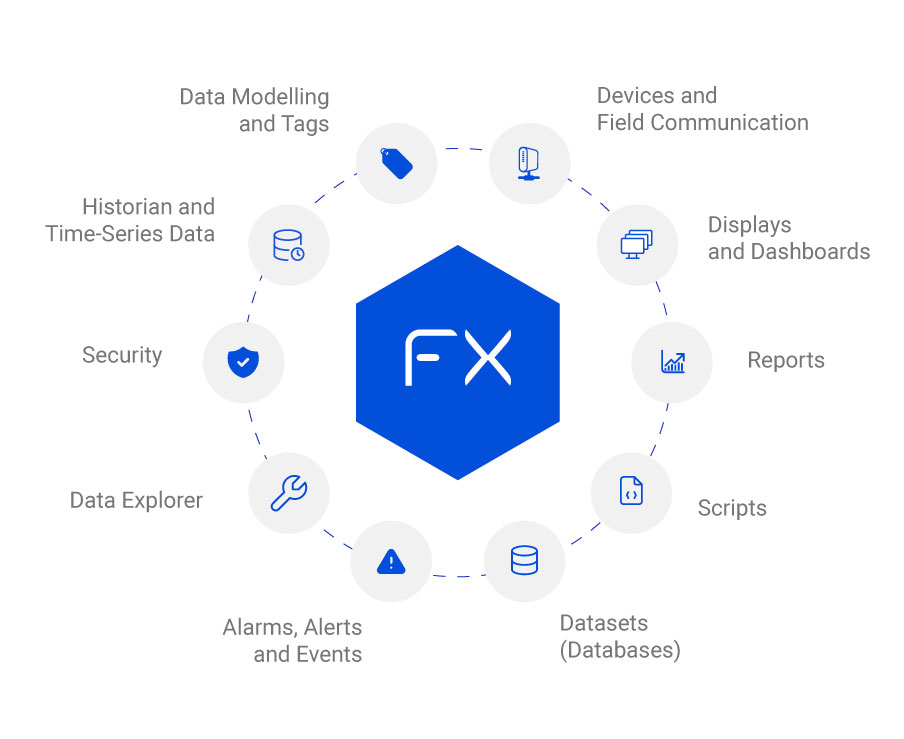
FrameworX delivers industrial-grade SCADA performance with enterprise flexibility. Native high-speed connectors talk to the device directly, with no middleware layer in the path, while dual-language extensibility (C#/Python) enables rapid custom development. Purpose-built for demanding operations requiring millisecond response times, zero-downtime deployment, and seamless IT/OT integration.
Modern Foundation
Multiplatform Runtime: Windows, macOS, Linux, containers (Docker).
Advanced Scripting: .NET (C#/VB) & Python 3. Server and client sides, fully available on Edge.
AI-Native: Three MCP servers plus an in-process AI agent spine, all released and supported today. ML integration (ML NET 4.0) and AI-assisted documentation.
Security & DevOps: RBAC, Secrets management, Audit logging, GIT Json files, managed code, Health & management APIs.
Unified by Design
Unified Designer: One tool to configure all modules, UI Displays, and track changes.
Build Once, Run Everywhere: Deploy displays to .NET desktop & WebAssembly (web/mobile) without modification.
UNS-Native: Local Tags & global connectivity (Linked Tags and Dynamic Tags). Built-in MQTT broker & client (flat & Sparkplug B).
Complete from Day One
Industrial Core: Historian (time-series data), Alarms, Displays, Reports.
Datasets (SQL): Query Editor, SQL bridge, Edge SQL, datasets caching.
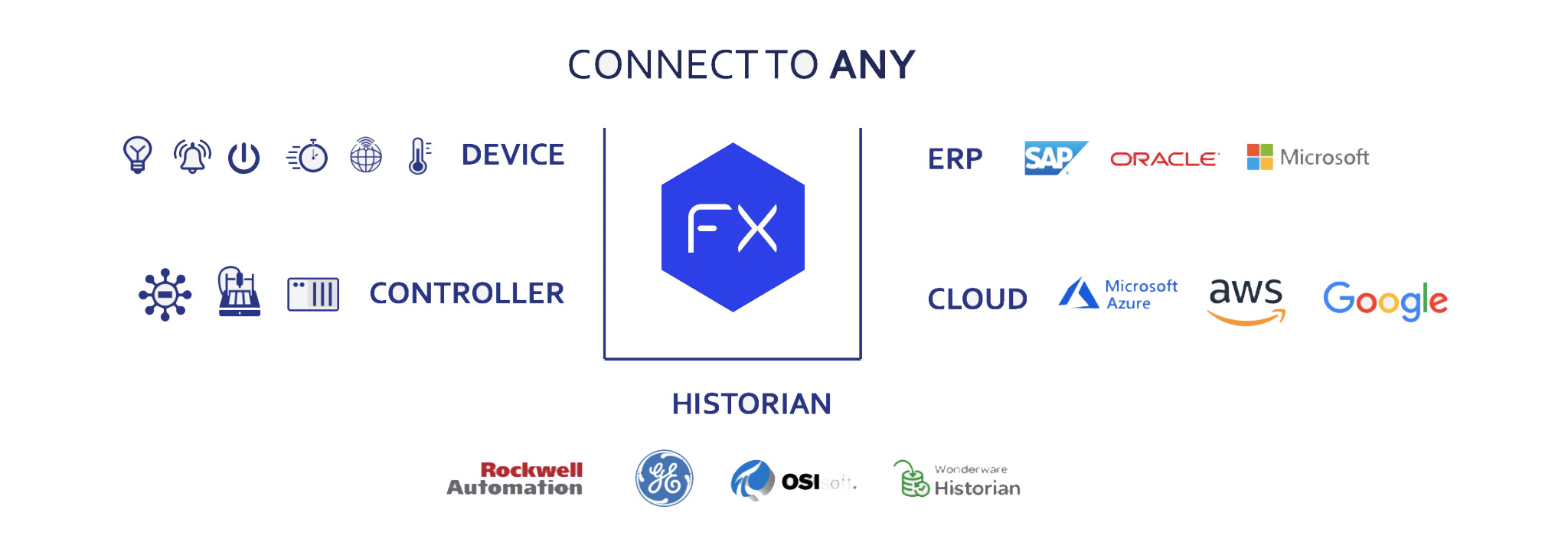
Open Connectivity: OPC UA (server & client); 100+ connectors built-in & extensibility toolkit.
High Availability: Hot-standby failover capable across all editions.
The other packages we looked at were either extremely long in the tooth, could only communicate with a single PLC, or were lacking in data collection capabilities (…) FrameworX also provides the tools for us to make complex animations that were essential for us to separate ourselves from the competition.
- Rite Irrigation LLC
It’s not uncommon to hear, “This is like magic,” during Tatsoft training sessions when customers are upgrading from legacy solutions. Tasks such as design or troubleshooting can be completed in just one-tenth of the time with Tatsoft compared to traditional legacy systems.
- Control System Technologies
One of the main reasons we decided to work with Tatsoft is they have decades of experience in developing software products and understand the need to have a flexible, reliable platform on which to build applications that will last a long time.
- Renifer Systems
I can’t tell you how many people have come through this building. International groups are very interested. We like showing it off. The system is a big change from what we had; everybody appreciates it.
- Cargill Feed Safety Research Center
Other key factors leading to our decision to use FrameworX were the wide range of options for displaying graphics, built-in .NET scripting for special requirements, communication flexibility, and competitive pricing.
- Water and Wastewater Industries
Product Architecture - How Your Solutions Scale
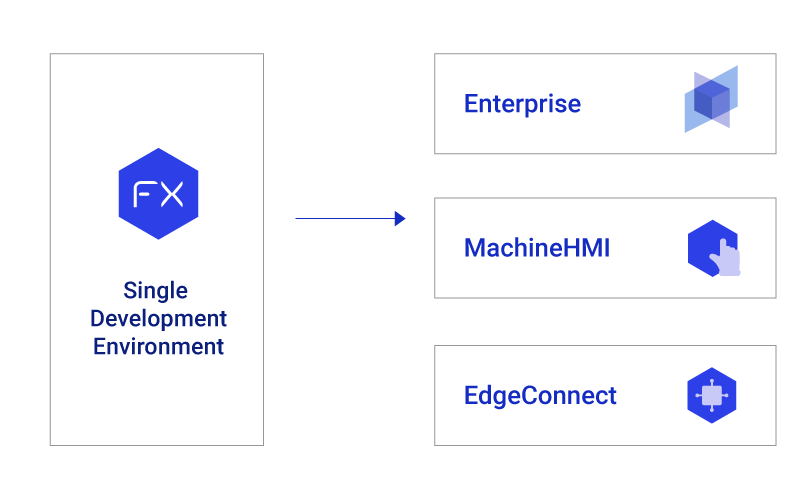
Start with EdgeConnect, which acts as the UNS Originator, bringing edge autonomy and intelligence to your system. Add local visualization at the edge with EdgeConnect View, or step up to MachineHMI as a UNS Participant for full machine-level operation with more clients. Finally, scale seamlessly to Enterprise, the UNS Orchestrator, delivering the full SCADA and IIoT platform.
To add local visualization and control, integrate MachineHMI as a UNS Participant, extending capabilities at the machine level.
Finally, scale seamlessly to Enterprise, the UNS Orchestrator, delivering the full SCADA/IIoT platform. This upgrade path ensures you can begin at the edge, grow with visualization, and expand to enterprise-wide orchestration, all while preserving your investment.
Learn more about our solution for Distributed Systems.
Product Editions Capabilities
| Feature/Series | Enterprise | MachineHMI | EdgeConnect |
|---|---|---|---|
|
Local Tags |
Unlimited |
Unlimited |
Unlimited |
|
I/O Scaling (*1) |
Unlimited or 1,500/5,000/15,000 |
Scale 150/500/1000 |
Unlimited |
|
Scripts (C#, VB.NET & Python 3) |
|
|
|
|
SQL Datasets & Reports |
|
|
|
|
MQTT, OPC UA & 100+ connectors |
|
|
|
|
Alarms & Historian |
|
|
Only EdgeConnect View |
|
Displays Clients |
Unlimited |
5 Users |
Only EdgeConnect View (2 Clients) |
Key Features Built for Modern Industrial Operations
FrameworX integrated elements that enable the secure and efficient deployment of industrial applications such as: SCADA, HMI, IIoT, MES and others based on your needs.
Real-Time Tags
Tags, Assets and Templates are the core components of the real-time data. FrameworX has a built-in real-time, event-driven, in-memory database, that manages the tags, assets and events in the application.
Databases and SQL
The Dataset Module provides an easy-to-use interface to any external Database or Process Historian (SQL Server, Oracle, Access, PI, etc), XML, CSV, or text files with access to SQL queries, tables and SPs. Native SQLite is included with FX installation.
Trend and SQL Historian
Log real-time to internal SQL or external databases, like SQL Server, MS Azure, or Oracle, or the built-in SQL. Advanced trend and visualization and annotation features. Combine Historian curves with any SQL database queries.
Scripts and .NET
You can create powerful C#, VB.NET, Python code. The 100% .NET managed code makes us created with security in mind. Intellisense enables direct access objects, including Tags, Alarms, Databases and more.
Devices and Drivers
We include 100+ PLC and other protocols drivers to directly access data from PLCs, Remote IO, bar-codes, RFID and more. We have built-in OPC UA, Modbus and MQTT Client/Broker. And we have a toolkit for any driver.
Graphics Designer
Our Graphics Editor allows for easy creation of rich user interfaces with dynamic animations Resolution independence, isolation from the code, extensibility, and deployment to desktop, thin clients, web and mobile clients. Reusable Smart Symbols and Components.
Diagnostics and More
Tools to show status of running modules, log errors, get warnings and user defined messages, access runtime values and properties, enter simulated values, run in Test protect mode. Accelerate development, assist on startup, isolate, and diagnose.
Reporting and Data Access
Create dynamic reports with our Built-in Report Editor. Use Dynamic Symbols in Reports, save as Text, CSV, XPS, PDF. We also support Web-Services, XML and other data-exchange interfaces to provide data for external reporting tools
Alarms and Notification
Multiple alarm levels for each tag when logging, acknowledgement, displaying, etc. is pre-packaged to simplify the configuration. You can send notifications by email, SMS or voice. The Alarm Module with the Security Tools can provide what’s needed to create FDA 21 CFR Part 11 compliant applications.
Built-In SQL
Includes a full-featured embedded, encrypted SQL engine. Used as local historian with store/forward to any data source, process historians or SQL databases. Store runtime settings or data in tables for reports or display with our built-in DataGrid. Or integrate to any external .NET components.
Security and Redundancy
Dynamically change the project configuration, without stopping the runtime execution. Enable redundancy deployment with a simple check-box configuration. Automatically log project configuration changes, and manage project and product versions seamlessly.
Dashboard Builder
Design responsive dashboards easily with drag and drop panels to display Grids, Trend Charts, Pie Charts, Bar Charts, Gauges, or any Symbol/Custom Symbol. Create your dashboards for both .NET and HTML5 clients from the same engineering environment.
Other FrameworX Functionality
- Smart Tag Editing
- Integrate to Excel
- Built-In Version Control
- .NET Classes and Namespaces
- Gateway
- AVEVA PI Support
- Vector Graphics
- Dream Report Driver
- Multiple Monitors
- MQTT
- Portal
- OEM Branding
- Tag Import
- SQL Query Builder
- HTML5 and JavaScript
- Multi-Languages
- Diagnostics and Commissioning
- Python
FAQ | Industrial Automation Software
Modern industrial automation platforms are designed to seamlessly connect with PLCs, RTUs, and field devices using open, standardized communication protocols.
Tatsoft’s FrameworX exemplifies this open-architecture approach.
Key integration methods:
Native PLC drivers: Direct communication with major vendors such as Allen-Bradley, Siemens, Schneider, Mitsubishi, and Beckhoff.
Open protocols: Built-in support for OPC UA, Modbus, MQTT with Sparkplug B, DNP3 and BACnet, covering both legacy and modern devices.
Unified Namespace support: FrameworX integrates easily into MQTT Sparkplug B architectures, enabling edge-to-enterprise data flow.
Tag mapping and import tools: Simplify large-scale tag migration from existing PLC projects.
Custom driver SDK: Developers can build proprietary interfaces or bridge rare devices using Tatsoft’s Driver Toolkit and .NET APIs.
This open connectivity reduces integration cost, keeps your architecture portable, and allows engineers to manage mixed environments from a single platform, connecting data from PLCs, sensors, databases, and cloud systems into one unified industrial data model.
Security and redundancy are core requirements in any modern industrial system.
Tatsoft’s FrameworX implements defense-in-depth strategies to ensure system reliability and data integrity.
Security layers include:
- User authentication and role-based access control (RBAC) with Active Directory integration.
- Encrypted communication (TLS/SSL) across clients, servers, and field connections.
- Application-level audit trails and change management for traceability.
- Secure scripting environment supporting sandboxed C# and Python code.
Redundancy and high availability:
- Server redundancy: Hot/warm standby for runtime servers and historians.
- Client failover: Automatic reconnection for operator stations.
- Store-and-forward buffering: Prevents data loss during communication interruptions.
- Cloud and hybrid deployment options: For distributed resilience and data backup.
Together these features support an architecture built to ISA/IEC 62443 practice, and Tatsoft publishes configuration guides for IEC 62443, FDA 21 CFR Part 11 and NERC-CIP. These are engineering guides rather than third-party certifications; compliance is assessed on the installed system.
Yes for SCADA, HMI, IIoT and historian: those are one product in FrameworX, built in one Designer and running on one runtime, which removes the integration layer and the duplicated tag databases that separate tools require. MES is different and worth stating precisely. FrameworX is not a packaged MES. MES functions such as OEE, batch records, work orders and genealogy are either built on the platform using its Datasets, Scripts and Displays, or integrated with a dedicated MES product through SQL, OPC UA and REST. Many plants do exactly the first, because the data and the models are already there.
Industrial automation software has become increasingly scalable and accessible.
While early SCADA systems required enterprise budgets, modern platforms like Tatsoft FrameworX scale down effectively for small OEMs, machine builders, and single-line operations.
Why small operations benefit:
- Lightweight deployment: Runs on small PCs, edge gateways, or even embedded devices.
- Licensing that fits the machine: local tags are unlimited in every edition, so you scale on external I/O points and clients, and every module and feature is included at any size.
- Fast setup: Drag-and-drop design tools minimize engineering time.
- Cloud-ready: remote monitoring and predictive maintenance without heavy infrastructure.
FrameworX licences are perpetual. Local tags are unlimited in every edition, so the paid scaling axis is external I/O points, meaning the physical signals arriving from the field rather than the number of tag names in your project. Every module, feature and 100+ connectors are included in each licence. Annual support is 20 percent per year, or 16 percent per year on a three-year term. Hot-standby redundancy adds 50 percent. Moving between editions costs the difference in price, with no upgrade fee. Published prices run from 750 dollars for EdgeConnect to 11,900 dollars for Enterprise Unlimited, and the full list is on the pricing page.
The runtime and the HTML5 web and mobile clients are cross-platform, running on Windows, Linux, Docker and macOS. The Designer engineering environment is Windows-only. In practice that means engineering happens on Windows and the finished solution runs wherever it is needed, including on an edge device or in a container, without being rebuilt for each target.
Yes. FrameworX reads from and writes to existing historians, SCADA systems and databases rather than requiring them to be replaced, with native TagProviders for AVEVA PI System, Canary, GE Proficy, InfluxDB, QuestDB and MongoDB. Control stays in the PLCs and RTUs, so a site can modernise the supervisory and visualisation layer area by area while the historical archive and its reporting stay where they are.